Live Trace
Telemetrick Live Trace module provides a set of data channels that you can show on screen, being updated live while driving. You can of course show your driver inputs but also of car data like tyres load, suspension travel, camber, aero etc.
You can even load an acViewer file to live compare your driver inputs to a recorded acViewer file, from yourself, or Telemetry Exchange, or importing a Motec file.
You can create and customize one or several live trace windows (move, resize, transparency, etc), and set whatever live telemetry trace container with any trace into, customizing nearly everything! These will also works when spectating other cars (some data may not be available).
Looking at these while driving isn't always easy, I would advise to get only a few. AND: This works in replay! So you can do a lap and watch at your replay with Live Compare showing your inputs against a ref lap, helping a lot in progression.
Live Trace module is independent for logging data. You can use Live Trace module without logging anything!
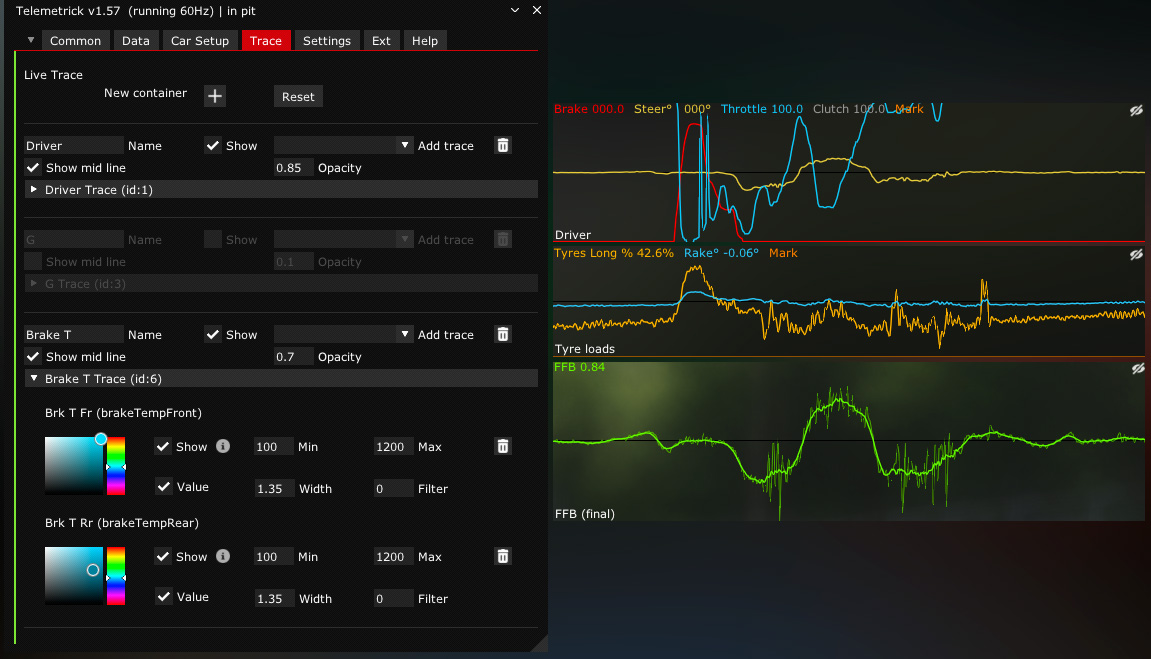
Settings
- Container settings:
- Set global container opacity.
- Show mid line or not.
- Per Trace settings (container dependant):
- Show: Hide or show this trace in its container. Allow to keep it with its settings without having it shown right now.
- Min / Max: Define the min and max values for data, settings the curve vertical scale inside its container.
- Value: Show current numerical value.
- Width: Change curve width.
- Filter: Smooth factor for displayed data. You can also show filtered and unfiltered curves.
- Color picker: Color of this data curve.
Default traces
By default, Live Trace have two containers, whith following traces:
- Driver
- throttle
- brake
- steer
- Perf
- performanceMeter
- speedPerfMeter
You can delete or create any container: a window with some parameters that will show some traces.
Fo each trace, you can change its color, width, min/max range, and even filter viewing result (higher filter means more filtered / averaged).
Available traces
- throttle
- brake
- steer
- gear
- clutch
- rpm
- engTorque
- engPower
- speed
- abs
- tc
- brakeTempFront (Average of both front brake disc temperature)
- brakeTempRear (Average of both rear brake disc temperature)
- tyreLoadLong (Ratio of both front wheel load versus rear load. Over 50% means more front load)
- tyreLoadLat (Ratio of both left wheel load versus right load. Over 50% means more left load)
- tyreLoadFL
- tyreLoadFR
- tyreLoadRL
- tyreLoadRR
- tyreSlipAngleFL
- tyreSlipAngleFR
- tyreSlipAngleRL
- tyreSlipAngleRR
- tyreMidTemperatureFL
- tyreMidTemperatureFR
- tyreMidTemperatureRL
- tyreMidTemperatureRR
- performanceMeter (Performance meter comparing this lap with best, seconds)
- speedPerfMeter (Speed meter comparing this lap with best)
- rake (Rake angle, calculated from ride heights)
- glat
- glong
- gvert
- FFB
- yawRate
- mark (Mark button pressed)
- damageFront
- damageRear
- plankWear
- suspTravelFL
- suspTravelFR
- suspTravelRL
- suspTravelRR
- Ride Height Front
- Ride Height Rear
- Drag
- Downforce F
- Downforce R
- Aero Balance