Installation
Requirement
- Content Manager
- CSP v0.2.8 or higher (recommended to use latest version).
Install
(Do not install via Content Manager.)
- Download and extract the ZIP file (Overtake).
- Copy
assettocorsafolder to your..\Steam\steamapps\common\assettocorsafolder.
You should end up with:
..\Steam\steamapps\common\assettocorsa\apps\lua\telemetrick\telemetrick.lua
- Since v1.70, Telemetrick also have a very lightweigth python app (no UI) to gather more data. Activate Pytlmk app in
SETTINGS/ASSETTO CORSA/PYTHON APPSto log those additionnal data.
- Open the app during a session and enable logging by checking the Log checkbox.
The app is accessible in a game session, in the right bar that appears when putting mouse on the right side of the screen. If the app bar doesn't appear, try alt+H.
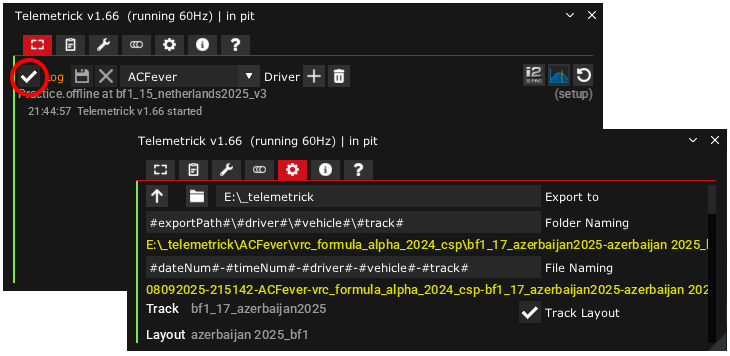
- Set your export folder in the settings; otherwise, files will be saved in the
user/Documents/apps/telemetrick/exportedfolder by default.
The Workspace folder contains a predefined i2 workspace that you can use (optional).
Update
When updating to a new version of the app, you can safely delete entire app folders:
..\Steam\steamapps\common\assettocorsa\apps\lua\telemetrick
..\Steam\steamapps\common\assettocorsa\apps\python\pytlmk
All your app settings and telemetry files will remain untouched. Settings are saved into user/Documents/apps/telemetrick folder.
For hotfix, don't delete the app and simply paste / overwrite new files.
Settings
Naming patterns
#exportPath#: The root path set for exporting.#track#: Current track name.#vehicle#: Current car name.#driver#: Selected driver name in the Common tab.#dateNum#: Date when the log started (without special characters).#timeNum#: Time when the log started (without special characters).
#timeNum# is interesting because it prevent having two files with same name, making each file name unique.
Exporters
You can choose from three exporter options:
motec: Exports stint as.ldand.ldxfiles for Motec i2.CSV: Exports a corrected CSV file (compatible with Atlas, Marple, etc.).rawCSV: Exports a raw CSV file without downsampling (for debugging).
You can select any combination of exporters, or even non if you just use Live Trace module or log to acViewer only.
Logging modes
Different logging modes are indicated by the app's left vertical color marker:
- Grey: App disabled (no logging).
- Green: App enabled, but not currently logging.
- Yellow: App logging in AB track mode:
- Logs pit stop as an outlap, then a single lap.
- Auto-saves 0.5s after the finish line.
- Orange: App logging in normal mode:
- Pit stops divide logs into stints.
- Requires a full lap after the outlap to be valid.
- Red: App logging in race mode:
- Pit stops do not cut the stint (full race stint).
- Logs are always valid, allowing for start or T1 incident investigation.
- Logs should be automatically saved at the end of the race.
- It is recommended to enable CSP / New AI Behavior / AI race cooldown lap option. This will auto-save 2s after crossing the finish line.
Assetto Corsa should also save the current stint when quitting, but this is not always reliable.
Extended Control App
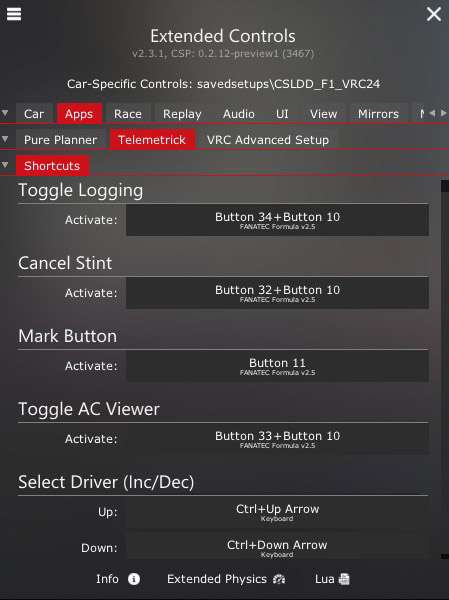
You can define following shortuts / binding in Extended Control App:
Data sampling rate (default: 30Hz)
Telemetrick logs and exports at four different data sampling rates:
- 1Hz: Weather conditions, fuel level, race flag, car damage, etc.
- 10Hz: Brake bias, invalid lap, DRS active, KERS charge, tire pressure/grip/temperature, etc. Extended car channels.
- 30Hz: Driver input, RPM, speed, TC, ABS, slip angle, etc.
- User-defined: Camber, toe, suspension travel, dampers, G, etc.
You can set a higher data sampling rate, but keep it lower than your average FPS. Keep in mind that exporting will take longer.
For example, you can log at 60 or 100Hz when building a setup and go back to 30Hz for qualifying/race.
Logging above 100Hz is usually unnecessary, except for special mathematical calculations related to suspension (derivative and integral calculations).
For reference, an F1 telemetry log captures around 300 channels from 1 to 1000Hz.
333Hs physic thread are only allowed offline, and still refresh lua data at render time. No known way of going higher for python and lua apps...
Troubleshoot
Sometimes, things goes wrong...
If your export files are missing, check the following:
- You have required version of CSP!
- You have last Telemetrick version.
- You have opened the Telemetrick app and enabled logging (Common tab).
- In the Settings tab, your export path and patterns are valid (clear inputs to reset to default).
- In the Settings tab, you have at least one converter enabled!
- You have completed at least two laps (including an outlap) and returned to the pit.
Then:
- In Assetto Corsa, open the
luadebugapp and check for error messages. - Check
\lua\telemetrick\lapsfor generated lap.txtfiles andlog.json. - Check
\lua\telemetrick\pyTelemetrick\pyTelemetrick_log.txtfor error messages.
When reporting a problem, provide a zipped laps folder or as much detail as possible (session type, app version, CSP version, etc.).